
Troubleshooting
The pane says the CLI is missing
Section titled “The pane says the CLI is missing”The extension drives claude.exe and never bundles it. With no CLI installed the pane says so and
links to the setup guide, instead of failing silently: install it as in
Getting started.

The extension looks for a file named claude.exe, in this order:
- the Claude executable path option (Options → General);
- every folder on the
PATHVisual Studio was started with; %USERPROFILE%\.local\bin(the native installer);- the npm global folders:
%APPDATA%\npmand%LOCALAPPDATA%\npm, undernode_modules\@anthropic-ai\claude-code\bin.
The npm shims (claude, claude.cmd, claude.ps1) are skipped: they cannot be launched.
Two things follow. If you installed the CLI while Visual Studio was open, restart Visual Studio so
it sees the new PATH. And a path set in the option that does not exist, or is not an .exe, is
not an error: the extension falls back to auto-detection and writes a warning to the log, so check
Info in the pane’s More (…) menu to see which binary is really running.
A pane runs against the wrong session, folder or CLI
Section titled “A pane runs against the wrong session, folder or CLI”Open Info from the pane’s More (…) menu: the session’s title, id and .jsonl path, the
working directory and profile, and which claude.exe is running it (path, version and PID).
A single file opened on its own, with no solution or folder around it, starts the pane in your home directory: see Known issues.
The CLI process exited
Section titled “The CLI process exited”A bar is shown in the chat if the CLI process exits unexpectedly. Your next message starts it again on the same session, profile and permission mode.
What the CLI writes on its error stream is shown in the chat only when the process is gone; while
it runs those lines are warnings and go to the log, tagged [stderr]. Turn on the log, below,
before reproducing the problem.
Turn on the log
Section titled “Turn on the log”Silent by default; invaluable when something misbehaves or you’re filing a bug.
-
Tools → Options → cv4vs Agents → Debug → Log level.
Noneis silent;Traceshows every wire: the NDJSON traffic to and fromclaude.exe, the chat bridge, and each MCP tool call. -
View → cv4vs Agents → Developer → View output log opens the Output window pane cv4vs Agents.
-
Reproduce the problem. Every line is tagged with the pane it came from (
[chat#2],[cli#1]), so several open panes stay readable in the one Output window.
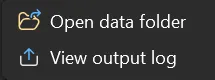
View → cv4vs Agents → Developer → Open data folder opens the folder the extension writes to; what is in it is in Settings and data. Open sessions folder, in a pane’s More (…) menu, opens the CLI’s session folder for that pane’s working directory.
Specific problems
Section titled “Specific problems”Report a bug
Section titled “Report a bug”View → cv4vs Agents → Help & Feedback holds Documentation (this site) and three forms on GitHub:
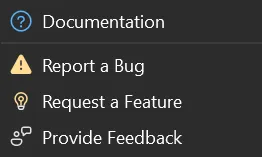
- Report a Bug: the bug report form, with the extension version filled in for you.
- Provide Feedback: tell us how it’s going, with the version filled in too.
- Request a Feature: the feature request form.
Beside it, Release Notes opens the notes of the version you are running, and About shows that version. Settings, in the same menu, opens the Options pages without going through Tools → Options.
Not ours: claude.exe
Section titled “Not ours: claude.exe”Problems in claude.exe itself belong to
the CLI’s own tracker; this extension drives
the CLI, it doesn’t ship it.