
Reviewing changes
Every Edit the agent proposes shows up in the chat as an inline diff. You can read it there, or open it in Visual Studio’s own diff, with the full editor.
Inline diff
Section titled “Inline diff”Each Edit (and MultiEdit) tool row renders a preview of the diff: the added and removed lines with a few lines
of context around them, syntax-highlighted for the file’s own language, and with the changed words
marked inside a line that was edited rather than rewritten. The row’s title carries the counts:
+3 −14, the same numbers git would report.
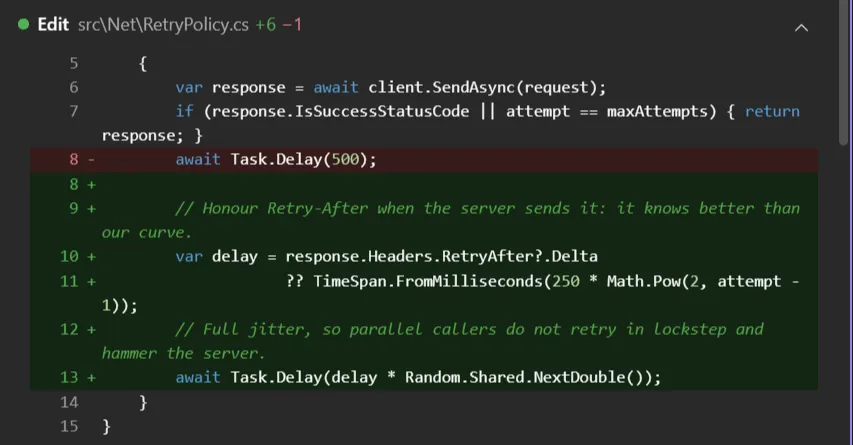
The line numbers are the file’s, not the fragment’s, and come from the patch the CLI computes when it applies the edit. While the tool is still running there is no patch yet: the preview shows what is being changed without a line gutter, and gains the numbers once the edit lands.
Long lines wrap instead of scrolling sideways, so the preview reads in a docked tool window. A large change is cut short: the preview shows at most 12 rows, with 3 lines of context, then … N more lines. Click it to see the whole thing in Visual Studio’s own diff.
A Write creates or replaces a whole file, so there is nothing to compare: its row shows the
content itself, highlighted for the file’s language, with the line count in the title (Write Foo.cs (42 lines)). Clicking that content opens it in a Visual Studio document.
Opening the file at the change
Section titled “Opening the file at the change”Clicking the path on an Edit row opens the file in Visual Studio with the changed lines already selected, not the whole hunk: the context lines a patch carries either side are left out, so the selection is what the agent actually wrote.
The range comes from the same patch the preview renders (the one the CLI produces when it applies
the edit), so the jump and the diff can never disagree about where a change is. Nothing is searched
for in the file, so it still lands correctly after the edit has been applied (the usual case) and
after later edits have moved the lines. A Write creating a new file has no patch and simply opens
it, as does a tool still running; a MultiEdit selects the first change.
Turn it off with Select lines when opening file (Options → Chat) to just open the file.
Open in Visual Studio
Section titled “Open in Visual Studio”Clicking the preview of an Edit opens the change in Visual Studio’s native side-by-side diff, in a
tab named Claude Code: <file>: Original on the left, Proposed on the right. It compares
the text the edit replaces with the text it puts there, with the editor’s own colouring and
navigation. Clicking the same row again closes it; opening another change replaces it, so the chat
never leaves a trail of diff tabs behind.
This view is for reading. In a Chat pane the change is approved or refused in the conversation, with the approval prompt (see Permissions): saving or closing the diff tab decides nothing, and the tab closes by itself once you answer.
The editable diff
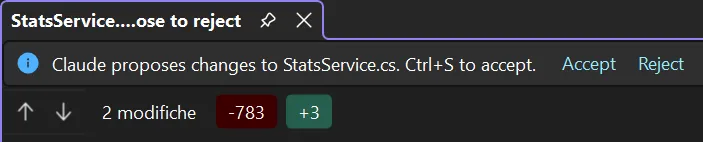
Section titled “The editable diff”Visual Studio has a second diff, and that one does decide. The
editor_open_diff tool opens the whole file against a
proposed version of it, in a tab whose title ends in Ctrl+S to apply · close to reject, with an
Accept / Reject bar above the editor. The proposed side is a real editor: you can change it
before deciding.
| You | The tool answers |
|---|---|
| Ctrl+S, or Accept | FILE_SAVED, with the text as you saved it, your own changes included |
| close the tab, or Reject | rejected |
The call waits until you decide. The tool does not write the file: it hands the saved text back to whoever opened the diff, and that caller applies it.
In a Chat pane nothing opens this diff for an Edit waiting on your approval: the prompt is what answers the CLI, and the diff you reach from the preview is the read-only one above. The agent can open the editable one itself, when you ask it to show a change before making it (“show me the diff first”): it then gets back what you saved and makes the edit from that.