
File history
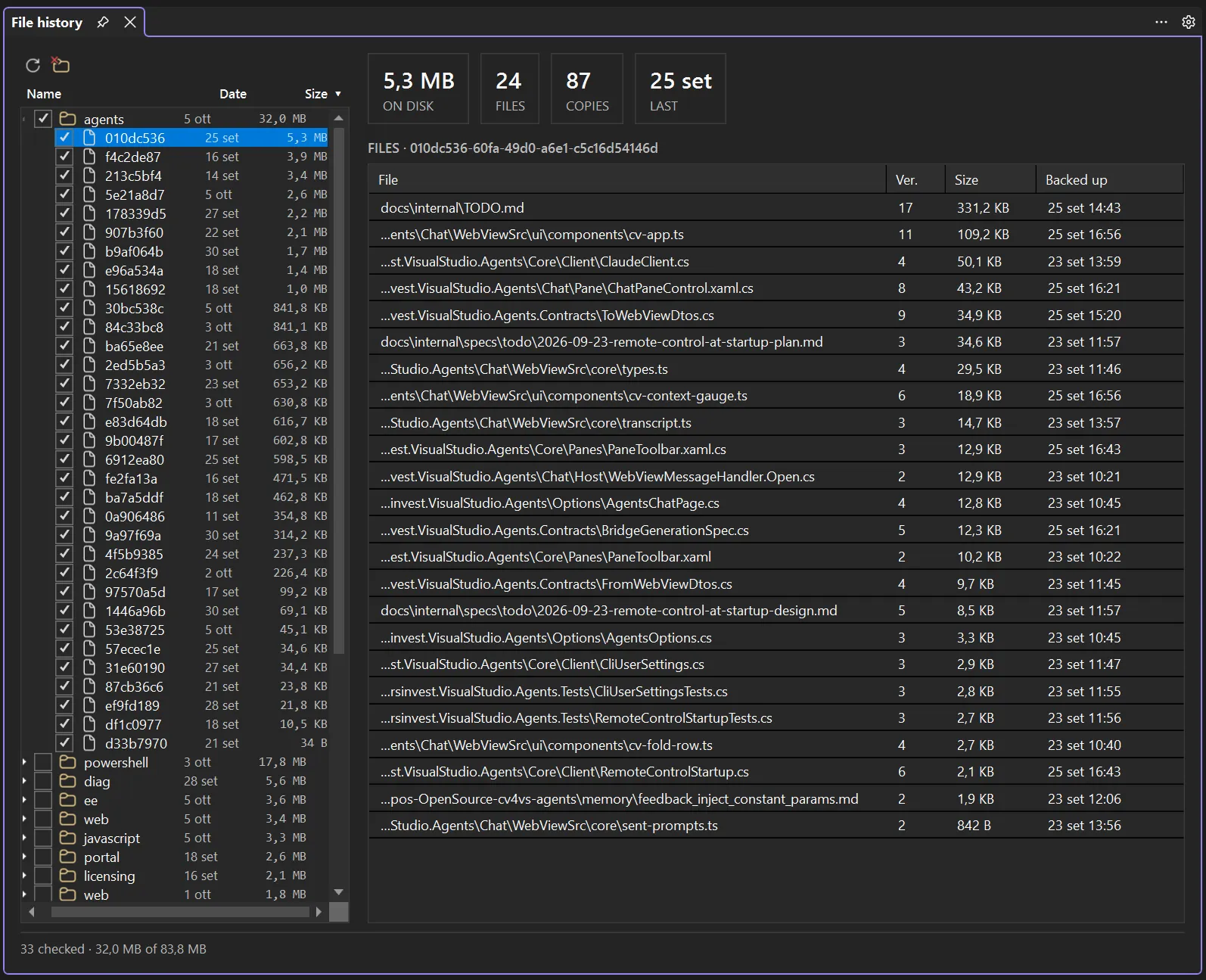
A full-window view under View → cv4vs Agents → Analytics → File history: what the CLI’s file backups occupy on disk, which files each session preserved, and a way to delete the ones you no longer want. It opens as a document-tab in the editor area, next to Statistics, Usage and Context usage.
What it reads
Section titled “What it reads”Before overwriting a file, the CLI copies it into ~/.claude/file-history/<session>/. Those copies
are what a rewind restores from, and nothing prunes them: they stay after the session ends, and
after the transcript itself is deleted. On a development machine a few dozen sessions come to tens of
megabytes.
The copies are named by a hash of the path plus a version (072f0f4b…@v6), so the folder alone can’t
say which file a copy belongs to. That mapping lives in the session transcript, in the
file-history-snapshot records, which is why the file list is read only when you select a session.
Everything here is read from the local ~/.claude/ of each configured profile. No CLI process is
started and nothing is sent anywhere.
The tree (left)
Section titled “The tree (left)”Config-dir → project → session, with the newest backup date and the size on every row. Sessions
are the leaves: a row is one file-history/<session>/ folder, labelled with the first 8 characters
of the session id; the tooltip has the full id, the copy and file counts, the last backup time and
the folder. The tree opens sorted by size, largest first.
- The config-dir level appears only when profiles resolve to more than one. Several profiles
usually share
~/.claude, and a tree rooted on profiles would count the same megabytes twice, so the root is the directory; the tooltip names the profiles using it. - Sessions no longer on disk is a group of its own, last in the list: backups whose transcript is gone. Nothing else refers to them, which makes them the first thing worth deleting. Their real file paths can’t be recovered: without the transcript, only the folder is left to open or delete.
Click Name, Date or Size to sort; click the same header again to reverse it. The ordering applies to every level at once, and an arrow marks the column in effect. There is no date filter on purpose: it would hide exactly the old sessions this view exists to find.
Refresh re-reads the folders. Nothing is indexed and nothing is cached: the sizes come from the filesystem, which already knows them.
The files (right)
Section titled “The files (right)”Selecting a session shows what it backed up, one row per file with its latest copy: file, version, size, and when that copy was taken, largest first. Earlier versions of the same file are counted in the copies tile and are still in the folder (Open the backup folder), but only the latest can be compared or saved from here. The tiles above give the session’s totals: size on disk, distinct files, copies (one per version of each file), and the date of the last one.
- Double-click a row (or Compare with the current file) opens a diff between the backup and the file as it is now, in Visual Studio’s own diff viewer.
- Save a copy as… writes the backup wherever you choose. It is deliberately not called “Restore”: it saves a file and leaves both your working copy and the conversation alone. Going back in a conversation is rewind, which lives in the chat pane.
- Open the backup folder shows
file-history/<session>/in Explorer.
A transcript can name a copy the CLI has since pruned; such rows are left out rather than shown as entries that can be neither diffed nor saved.
Deleting
Section titled “Deleting”Tick sessions in the tree (a parent ticks everything under it) and press the delete button. The confirmation names how many sessions, copies and files go, and how many megabytes that frees.
Two things are worth knowing before you press it:
- Your project files are never touched. Only the copies under
file-history/are removed. - The copies are gone for good, and rewinding those sessions stops working. The transcript keeps the records, but the files they point at will not be there.
A session that an open pane is driving cannot be deleted: its checkbox is disabled and the tab’s status line says how many are held that way (N sessions are open in panes: not deletable). Only the panes of this Visual Studio are known: a session running in a terminal, or in another Visual Studio, is not protected. Deleting the copies a live rewind restores from would break it half-way, so the consequence sits in the control rather than in a warning you can click past.
What it is not
Section titled “What it is not”This is an archive, not a second rewind. It shows and deletes; it never writes into a conversation. Restoring files and moving a session back is rewind, and it only works on the session its own pane is driving; the running CLI knows nothing about the others.