
Context usage
A full-window view under View → cv4vs Agents → Analytics → Context usage: for any historical session, how it fills the model’s context window: model, categories, a memory-map, and the files/agents/skills/tools loaded into context. It opens as a document-tab in the editor area, next to Statistics and Usage. (For the current chat’s context, use the in-chat gauge, see Context, usage & statistics.)
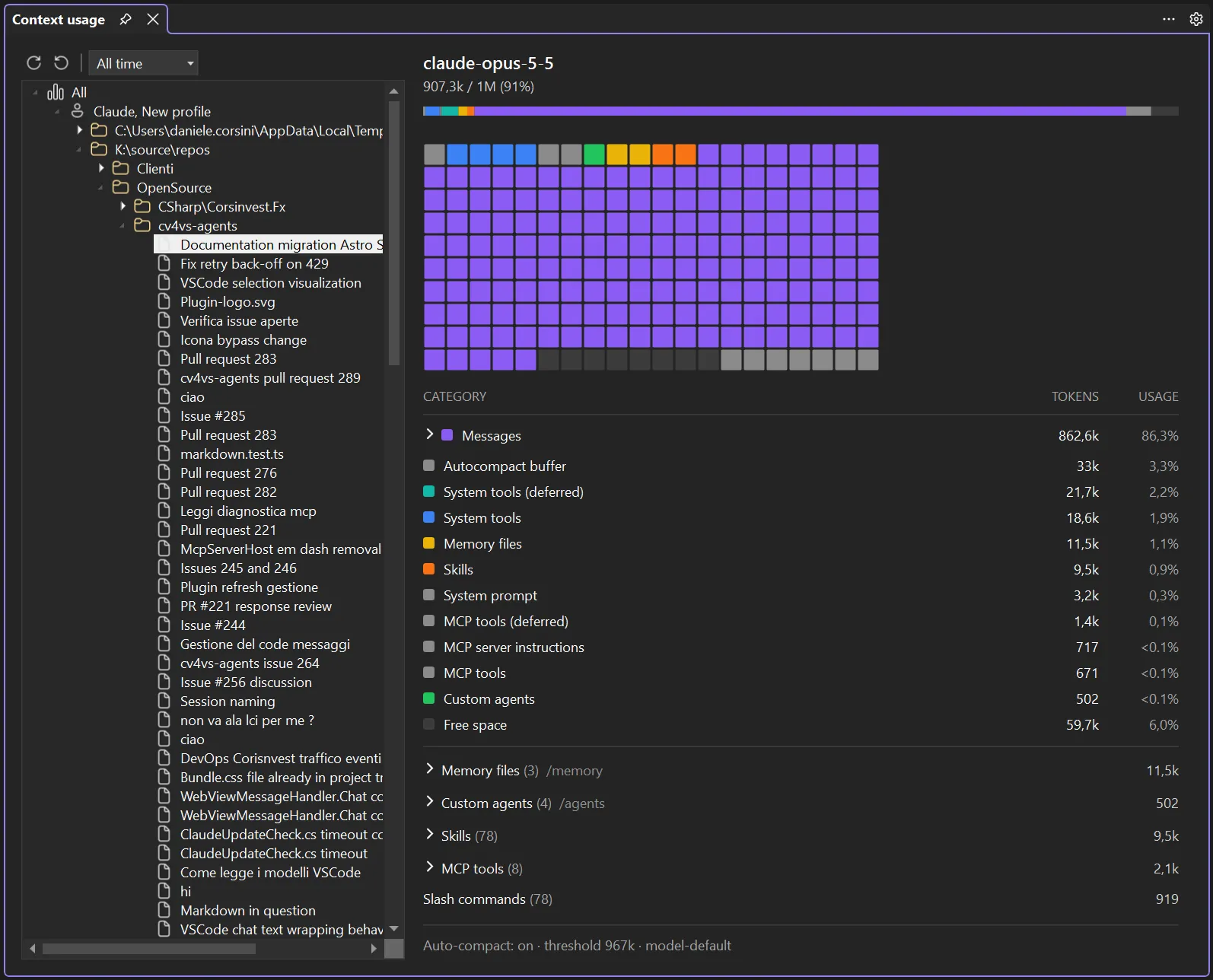
The tree (left)
Section titled “The tree (left)”The same scope tree as Statistics (All → Profile → Folder → Project → Session) but without the calendar levels: a project expands straight to its sessions, one row per session file (titled from the chat). Context is per-session, so only a Session is clickable for the breakdown; the intermediate nodes (All / Profile / Folder / Project) only navigate: until you pick a session the right side shows Select a session to see its context usage.
The Range selector (7 days / 30 days / All time) filters the tree, and Refresh re-reads changed sessions; Recreate rebuilds the index from scratch. Both fetch the visible session again.
The breakdown (right)
Section titled “The breakdown (right)”Clicking a session loads its context window (see How it works), then shows, mirroring the in-chat context dialog:
- Header: the model id and
used / max (percent%). - Gauge bar: a segmented bar coloured per category, sized by each category’s share of the window.
- Memory map: a grid of cells, one per slice of the window, coloured by the category that fills it (empty cells stay grey). Hovering a cell shows its category and tokens.
- Category table: CATEGORY / TOKENS / USAGE, one row per category (System prompt, System tools, Custom agents, Memory files, Skills, Messages, Free space…), each with a colour dot matching the bar. Messages expands into its parts (tool calls, tool results, attachments, assistant/user messages…).
- Trees: expandable sections for Memory files (
/memory), Custom agents (/agents), Skills, MCP tools and Slash commands, each grouped by source with per-item tokens. Memory-file paths are links: click one to open the file in the editor. - Footer: the auto-compact state (on/off, threshold, source).
How it works
Section titled “How it works”Reading a closed session’s context requires loading its messages, so the tab spawns a short-lived
claude.exe that resumes that session and asks the CLI for get_context_usage: a read-only
calculation (token counting), no message is sent and the session file is not modified. The first fetch
takes a few seconds; the result is cached in memory, so re-selecting the same session is instant.
Refresh drops the cached value and fetches again. This complements the in-chat context gauge, which
covers the current session; the tab is for any historical one.
Two limits follow from how it is fetched. The CLI gets 20 seconds to start and 30 to answer: past
that the page reads Context usage unavailable. And the process is started with your own MCP
servers but without the IDE’s vs server, so the IDE tools are absent from a historical breakdown
while they are present in the in-chat one.