
Sub-agents
Claude can fan work out to sub-agents: separate agents it spawns to handle a piece of the task in parallel (searching a large codebase, running independent checks, reviewing several files at once). They run on their own, report back, and the main turn continues.
That is powerful and easy to lose track of: several agents can be running at once, each burning tokens, and a chat that simply streamed everything would drown you. The extension surfaces them in two places: a live panel while they run, and collapsible rows in the conversation.
While they run: the composer chip
Section titled “While they run: the composer chip”As soon as a sub-agent starts, a chip appears in the composer toolbar: a bot icon with a badge counting the active sub-agents. It is only there while something is running: no sub-agents, no chip.
Clicking it opens the sub-agents panel:
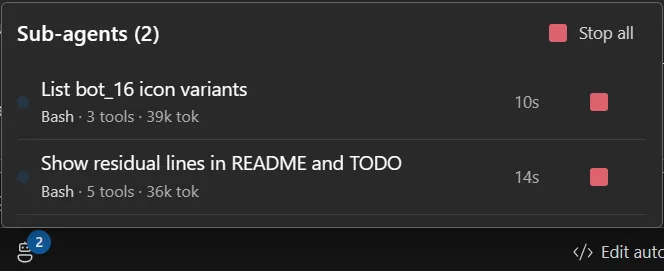
Each row shows:
| A live dot | the agent is running |
| Description | what it was asked to do |
| Current tool · totals | the tool it is using right now, then tool count and tokens spent |
| Elapsed | how long it has been running |
| Run in the background | lets the main turn finish without waiting for this agent; it moves under Background and keeps running |
| Stop | ends that agent |
Plus Stop all in the header, which stops every one of them. Agents launched by another agent are indented under it.
The current tool matters more than it looks: with several near-identical agents (“Run build simulation loop”, “Run scan simulation loop”) it is often the only thing that tells them apart.
Background and async sub-agents are tracked too: the turn is reported as finished only once they have actually finished, not when the main reply ends.
In the conversation: nested rows
Section titled “In the conversation: nested rows”The Agent row starts closed: its title, a running clock and the chevron. Open it and you get the
prompt the sub-agent was given (IN), its report once it has one (OUT), and its own tool
calls nested underneath, populated as they happen. The box shows the last 3 steps; a … line
above them says there are earlier ones.
Show all, in the row’s header, loads the whole run, every step in order. Reduce goes back to the last 3. A button under the nested rows copies the sub-agent’s output.
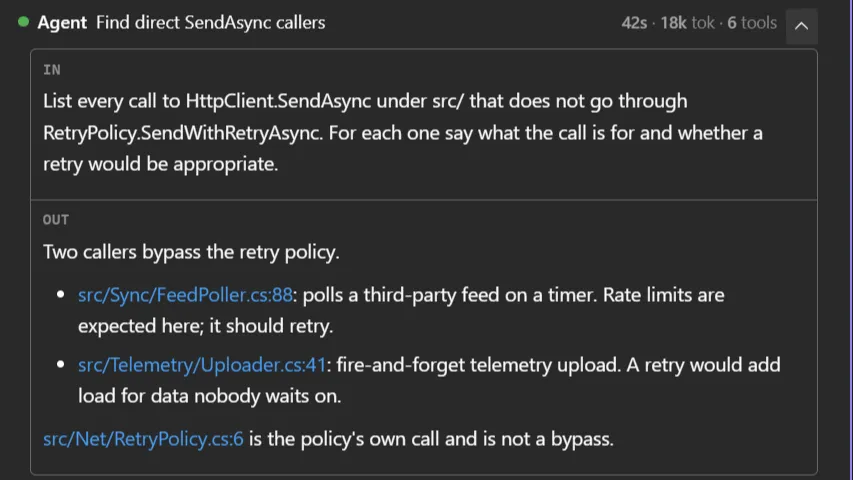
This is the same lazy rule the rest of the chat follows: nothing heavy is loaded until you ask for it. A sub-agent that ran for two hundred steps costs nothing to scroll past, and shows everything the moment you ask.
Sub-agent transcripts are replayed in history too, so re-opening an old session shows the same nested structure; again, fetched only when you ask. A sub-agent that failed turns its Agent row red; one you stopped does not.
Stopping them
Section titled “Stopping them”Two ways, both from the panel:
- Stop on a row: that agent only. The others carry on.
- Stop all: every running sub-agent.
There is no confirmation: stopping is immediate. A stopped sub-agent reports back as cancelled and the main turn continues with what it has.