
Another provider
Each pane can run on a different provider (native Claude, GLM/z.ai, or any other Anthropic-compatible host) and the IDE tools work the same either way. What makes that possible is a profile.
What a profile is
Section titled “What a profile is”A named set of environment variables (e.g. ANTHROPIC_BASE_URL, ANTHROPIC_AUTH_TOKEN, model
overrides) injected into that pane’s claude.exe, so a pane can run on a different provider while
the IDE MCP tools keep working.
Profiles are edited under Tools → Options → cv4vs Agents → Profiles. It is not a settings table but an editor:
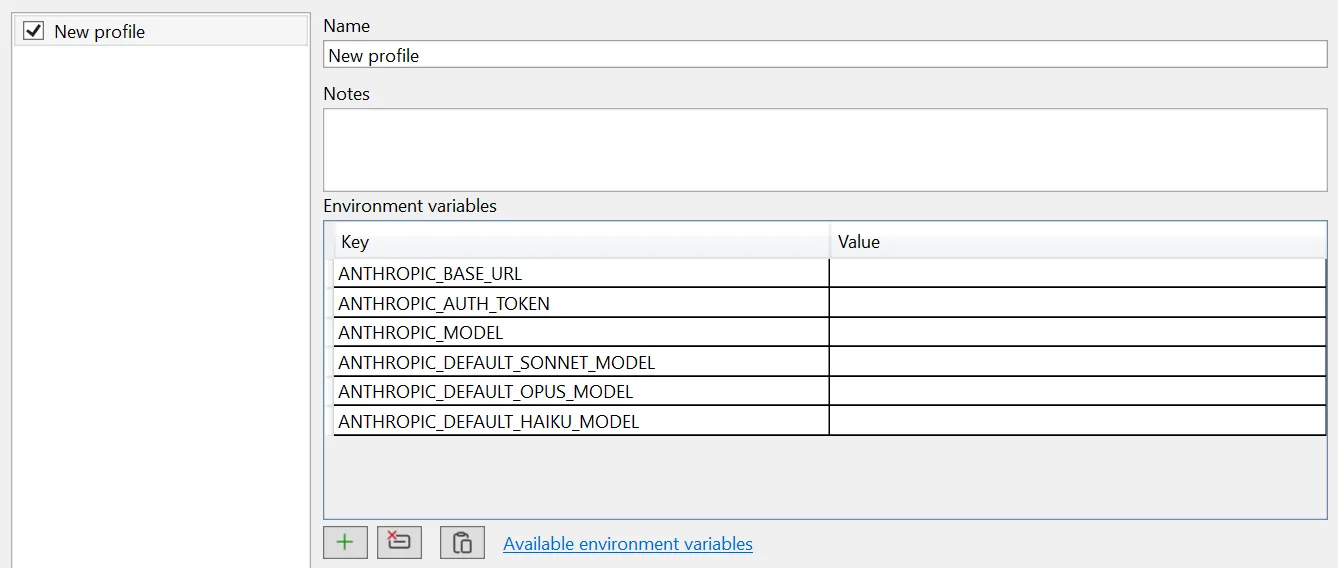
Profiles are listed on the left (the checkbox enables one), and edited on the right: a name, optional notes, and the environment grid, pre-filled with the keys you are most likely to need, so a new profile is usually just a matter of pasting two values. Available environment variables links to Anthropic’s reference for everything else the CLI understands.
Enabled profiles appear under View → cv4vs Agents, and the active one is shown in the pane caption and toolbar.
A few rules:
- Claude, the native profile, is not stored: it is the process environment as it is. A profile
of your own named
Claudereplaces it. - Setting
CLAUDE_CONFIG_DIRin a profile gives it its own config directory: separate login, settings, sessions, statistics and file backups. Profiles without it share~/.claude. - A new pane opened from a pane’s toolbar inherits that pane’s profile.
- A profile with a blank name, or disabled, is ignored everywhere.
- A profile’s variables are applied first and the extension’s own last, so a profile cannot
override
CLAUDE_CODE_ENTRYPOINT.
Paste from JSON
Section titled “Paste from JSON”The editor’s Paste from JSON button (the clipboard icon under the grid) fills the env grid from the clipboard, so you can lift a provider’s snippet straight from its docs. It accepts either a full settings block:
{ "env": { "ANTHROPIC_BASE_URL": "…", "ANTHROPIC_AUTH_TOKEN": "…" } }or a plain key/value map:
{ "ANTHROPIC_BASE_URL": "…", "ANTHROPIC_AUTH_TOKEN": "…" }The env object is used when present, otherwise the whole object.
Provider setup guides
Section titled “Provider setup guides”- z.ai / GLM: GLM, Kimi, DeepSeek, Qwen, MiniMax
- Qwen: DashScope Anthropic API
- MiniMax: Anthropic-compatible models
- DeepSeek: direct Anthropic API compatibility
- OpenRouter: multi-provider gateway
- Ollama: local open-source models
- Complete alternative models guide: comprehensive provider list
Without a profile
Section titled “Without a profile”Profiles are not the only way: the CLI reads these variables from the process environment like any shell would, so setting them at the OS level works too. Profiles are usually preferable: one pane per provider, switchable without touching your system environment.
What changes on another provider
Section titled “What changes on another provider”- Plan usage. A profile that sets an API key, an auth token, a base URL, or the Bedrock or Vertex switch has no plan limits, so the status bar item shows the icon alone, dimmed.
- Remote Control isn’t available on Amazon Bedrock, Google Vertex AI, or Microsoft Foundry, and
not with a custom
ANTHROPIC_BASE_URL: see Remote Control. - Statistics show model names exactly as the API returned them, so a third-party provider’s model ids stay readable.
Where the token is stored
Section titled “Where the token is stored”Unlike General, Chat and Debug, profiles are not stored in the VS settings store: they live in
profiles.json so the menu can list them without opening the Options page first; see
Settings and data.