
Rewinding files
Claude keeps a copy of every file before it edits one. /rewind puts them back the way they
were before a message you pick, without touching the conversation, which stays exactly where it
is.
It is the answer to “that last hour went the wrong way”: the files return to a known point while the chat keeps the context that got you there.
Using it
Section titled “Using it”Open the / menu and pick Rewind files…, under Context (typing /rewind finds it). The dialog lists the
messages this session can go back to, newest first, and clicking one shows what returning there
would change:
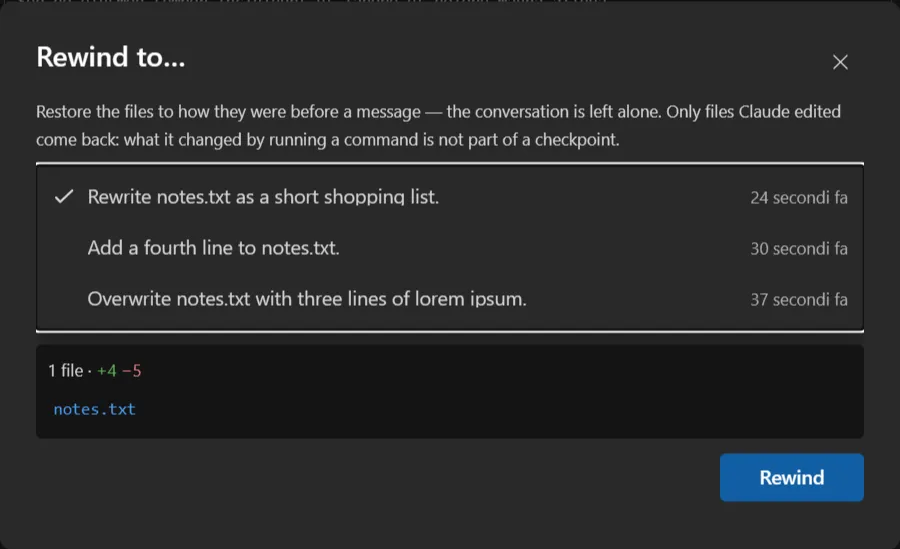
The panel under the list is the answer to “what happens if I press this”: how many files, how many lines added and removed, and which files. Clicking a message never touches them: the figures come from asking the CLI what it would do. Only the Rewind button writes anything, so the list is meant to be browsed.
Clicking a file opens it in Visual Studio’s own diff: the copy from before that message on the left, what is on disk now on the right. It is the same viewer the chat uses to review a change, so the two sides are real editors.
With more than six messages a filter box appears above the list. The arrow keys walk the list (while you are still typing in the filter) and Home/End jump to the ends.
What comes back, and what does not
Section titled “What comes back, and what does not”Only files Claude edited through its own file tools are covered. What it changed by running a
command (sed, git checkout, a build script, a shell redirect) is not part of a checkpoint and
stays as it is. A rewind after a turn that mixed the two puts back one half and leaves the other.
Directory operations are not covered either: a folder created, moved or deleted stays that way.
A file the message created has no earlier version to restore, so rewinding past it deletes it. Its diff shows an empty left-hand side, which is what that means.
Symbolic links are not restored: the dialog says how many (N symlinks will not be restored.).
Messages that changed no file are not listed at all; there would be nothing to restore. And when the code has not changed since the message you picked, Rewind is disabled, with the reason.
Where the copies live
Section titled “Where the copies live”Under ~/.claude/file-history/<session-id>/, one folder per session, holding whole files rather
than diffs. They belong to the CLI, are private to their session, and are not cleaned up: they
stay until the folder is deleted. File history shows what they cost across
every session, and deletes the ones you no longer want.
That is the reason the feature can be turned off. Keep file checkpoints (Rewind)
(Options → Chat → Files, on by default) decides whether the CLI takes
them at all. With it off no copies are written, and the /rewind command is hidden rather than
offered as something that can only decline.
The setting is read when a chat starts, so changing it leaves any chat already open as it was: the pane says so when you apply it (File checkpoints stay on for this chat; turning them off applies to the next one you open., or File checkpoints are off for this chat; open a new one to start keeping them.), and the next chat you open follows the new value.
Limits worth knowing
Section titled “Limits worth knowing”- 100 restore points per session. The CLI keeps the most recent hundred; past that the oldest stop being reachable. The copies themselves stay on disk.
- One session only. A checkpoint belongs to the session that took it, so
/rewindoffers this chat’s messages and no others. - The conversation is never rewound. To go back in the conversation as well, use Fork on the message; it opens a new pane from that point and leaves this one alone.