
Remote Control
Remote Control lets you drive a running chat session from claude.ai/code or the Claude mobile
app. The session itself keeps running on your machine, in this pane, talking to your solution and
your MCP tools; the web page and the phone are just a window onto it, not a copy of it.
What you type there shows up here too, as your own message, followed by the answer; the pane keeps the whole conversation whichever side it was typed on.
Turning it on
Section titled “Turning it on”Open the / menu and switch on Remote Control, under Context: typing /remote-control, or
the shorter /remote, /rc, /phone, finds it. It
renders as a toggle, not a one-shot action: switching it on sends a control request to the running
CLI and waits for it to come up, switching it off tears the bridge down again. While the request is in flight the entry is taken out of the menu, so a second click cannot race
the first; it comes back as soon as the CLI answers.
Start it in every new session
Section titled “Start it in every new session”/ menu → Enable Remote Control for all sessions writes remoteControlAtStartup into the
profile’s settings.json, the same setting /config remoteControl=true sets in a terminal, and the
one the VS Code extension’s toggle writes. From then on every new chat of that profile starts
Remote Control by itself. Chats already open keep their own toggle: turning the setting on or off
never connects or disconnects them.
A session started this way does not post the link card: the toolbar indicator says it is on, and Show link and QR code in its menu posts the card when you want it.
It only acts on your explicit choice, and the CLI has the last word: a project whose
.claude/settings.json sets it to false keeps it off there, and an organization policy can lock
it: the switch then refuses to turn on and says why. If settings.json can’t be read (not valid
JSON), the switch says so and leaves the file alone.
The link and the QR code
Section titled “The link and the QR code”Once the CLI confirms the bridge is up, the session link is posted into the conversation, with a QR code beside it:
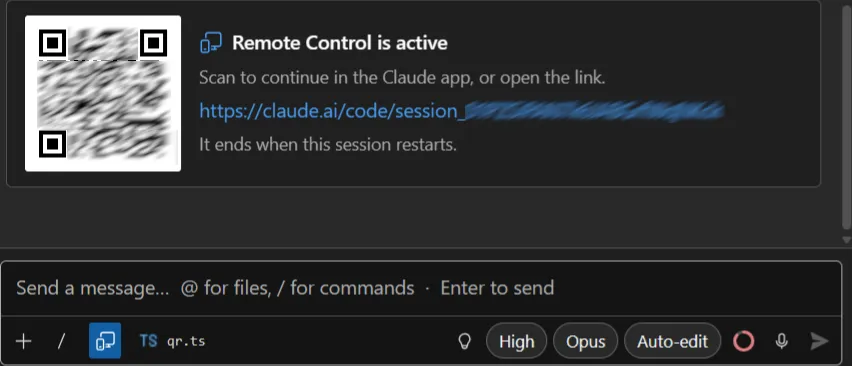
The QR is the part that matters. On this machine the link is redundant: the session is already on screen; what you need is a way to reach it from the phone you are about to pick up, and scanning beats copying a URL. The link is there too, and opens in your default browser: the WebView never navigates there itself.
It goes in the conversation rather than a banner above it because the link matters for a few seconds, and a pinned row would spend a line of a narrow tool window on it for the rest of the session. It scrolls away with everything else, and the toolbar indicator brings it back.
The toolbar indicator
Section titled “The toolbar indicator”While the bridge is up, a filled indicator appears in the input toolbar, before the active-file chip. It is the answer to “is this session still open to the outside?” without scrolling anywhere.
Clicking it opens a two-item menu: Show link and QR code posts the card again, further down the conversation, and Turn off Remote Control tears the bridge down.
If the CLI can’t establish the bridge (no login, a disabled feature flag, a stale CLI) that surfaces as a dismissible error notice at the top of the chat instead, with the CLI’s own reason behind a short prefix.
It dies with the pane
Section titled “It dies with the pane”Remote Control lives inside the claude.exe process the pane is driving. Anything that restarts
that process (closing the pane, reloading a session from history, changing the working directory,
forking) ends the remote session along with it, and the indicator goes with it. This isn’t a
choice this extension makes; it’s how the CLI’s control protocol works, and every pane in this
extension already respawns the process for those same actions.
Resuming a session does not bring Remote Control back by itself: in the stream-json mode this pane uses, the bridge only ever starts from an explicit request. Turn it on again, or switch on Enable Remote Control for all sessions above, then every process the pane starts, a resumed session included, asks for it.
A short network drop is not a disconnection. The bridge polls outwards and retries quietly, and the CLI reports nothing while it does; the indicator stays on, which is what the connection is actually doing.
Requirements
Section titled “Requirements”Remote Control depends on things outside this extension, and when it fails, the cause is almost always one of these:
- You need to be logged in to claude.ai (
/login); an API key alone isn’t enough. - It isn’t available on Amazon Bedrock, Google Vertex AI, or Microsoft Foundry, and not with a
custom
ANTHROPIC_BASE_URL: Remote Control assumes the standard Anthropic API. - On Team and Enterprise plans, an Owner has to turn Remote Control on in the organization’s admin settings before anyone on the plan can use it.
DISABLE_TELEMETRY,DO_NOT_TRACK,CLAUDE_CODE_DISABLE_NONESSENTIAL_TRAFFICorDISABLE_GROWTHBOOKall disable the feature-flag check Remote Control relies on to know it’s available, so any of them set will keep it off.
For the full picture of the underlying feature (what the web and mobile side look like, how the session syncs), see the upstream docs at code.claude.com/docs/en/remote-control.