

Services
A console shows the guest’s screen through Proxmox VE. Once the guest is up, most people work with the
protocol of its operating system instead: RDP to Windows, SSH to Linux. A service tells cv4pve-vdi how
to do that for one VM: which launcher to start (mstsc, PuTTY, ssh in a
terminal…), on which port, with which credentials.
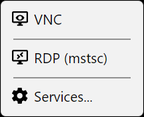
Services appear in the guest’s Connect menu, after SPICE and VNC:
Configure services for a VM
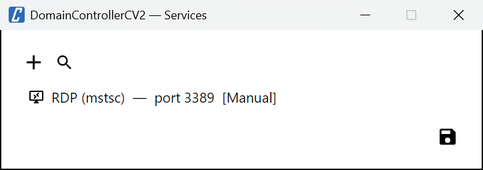
Section titled “Configure services for a VM”Connect → Services… opens the list of services of that guest, with + to add one, the search button to discover them, and edit and delete on each row (double-click also edits). Save keeps the changes. In kiosk mode the window asks for the admin password first.
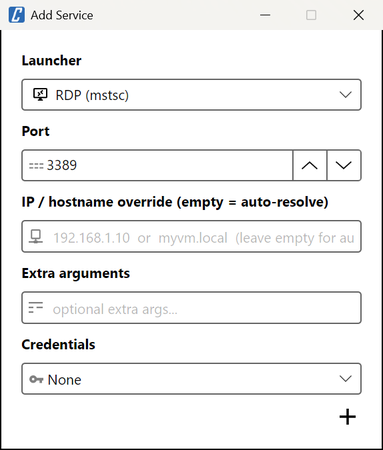
| Field | What it does |
|---|---|
| Launcher | The program to start. Only launchers for the current operating system are listed. |
| Port | Pre-filled with the launcher’s default port. |
| IP / hostname override | Where to connect. Empty: the VM’s IP address, read from the QEMU guest agent when you click. |
| Extra arguments | Replace the launcher’s default extra arguments for this service. |
| Credentials | None, Vdi or Manual, see Credentials. |
Services are stored per cluster and VMID in the configuration file of the computer: another computer, or another operating system user, has its own.
IP address
Section titled “IP address”Without an override, cv4pve-vdi reads the guest’s network interfaces:
- VM: from the QEMU guest agent (
GET …/agent/network-get-interfaces). This needs the guest agent running in the VM andVM.GuestAgent.Auditon it. - Container: from
GET …/lxc/{vmid}/interfaces. No agent is needed,VM.Auditis enough.
It uses the IPv4 address of the interface whose MAC address belongs to a network device configured in
Proxmox VE (net0 first), so the bridges of a guest running Docker (172.17.0.1, …) are skipped. Without
a match, it uses the first IPv4 address that is not a loopback. When no address comes back, cv4pve-vdi shows
Could not resolve IP address for this VM.
Set IP / hostname override when:
- the VM has no guest agent, or the account lacks
VM.GuestAgent.Audit; - the guest has several addresses and the one found is not the one to use;
- users reach the VM by a name or a NAT address.
Discover
Section titled “Discover”The search button in the services window lists what answers on the VM: cv4pve-vdi resolves the VM’s IP address through the guest agent, tries to open a TCP connection to the default port of each launcher of this system not yet configured for the VM, and offers those that answer within half a second.
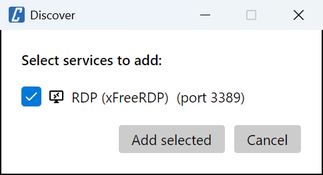
Tick the ones to add and click Add selected. They are added with the launcher’s default port and
credentials None; edit them afterwards to set credentials or arguments.
Credentials
Section titled “Credentials”| Credentials | What the launcher gets |
|---|---|
| None | No username or password. |
| Vdi | The username and password used to log into cv4pve-vdi, the Proxmox VE login. |
| Manual | A username and password saved with the service. |
What the launcher does with them depends on its argument template:
PuTTY and xFreeRDP receive them on the command line, the ssh launchers only the username (ssh asks for the
password), mstsc through the Windows Credential Manager.
Single sign-on for RDP (Windows)
Section titled “Single sign-on for RDP (Windows)”mstsc does not take a password on the command line: it reads saved credentials from the Windows Credential
Manager. The RDP (mstsc) launcher therefore writes the credentials there just before starting it (when both a username and a password are set) as a
domain password for TERMSRV/<ip>, and deletes the entry three seconds later. The entry is created for
the logon session only, and an entry for the same target that already exists is left untouched and used.
Which Credentials to choose:
| Credentials | Behaviour | For |
|---|---|---|
| None | Nothing is written: mstsc uses what Windows already has, including the credentials of the signed-in Windows user when the policy allows it. |
Computer and VM in the same Active Directory domain. |
| Vdi | The Proxmox VE login goes to the Credential Manager. | Proxmox VE and the VMs share the same accounts, e.g. an LDAP or AD realm. |
| Manual | The service’s own username and password go to the Credential Manager. | Local accounts, workgroups, another domain. |
With Vdi, the username is the one typed at login, realm included (alice@pve); if that is not an
account the VM knows, use Manual. For a local Windows account write .\Administrator to force a local
logon.
The Credential Manager exists only on Windows: a launcher that uses it cannot start on Linux or macOS.