

Launchers
A launcher says how to start one program on one operating system: executable, argument template, default port. A service then applies a launcher to a VM. Launchers are managed in Settings → Launchers, hidden in kiosk mode until an admin unlocks it.
Built-in launchers
Section titled “Built-in launchers”| Launcher | System | Executable | Port | Credentials passed |
|---|---|---|---|---|
| RDP (mstsc) | Windows | mstsc.exe |
3389 | Through the Windows Credential Manager |
| RDP (xFreeRDP) | Windows | xfreerdp.exe |
3389 | /u: and /p: |
| RDP (xFreeRDP) | Linux | xfreerdp |
3389 | /u: and /p: |
| RDP (xFreeRDP) | macOS | xfreerdp |
3389 | /u: and /p: |
| SSH (cmd) | Windows | cmd.exe running ssh |
22 | Username |
| SSH (PuTTY) | Windows | putty.exe |
22 | -l and -pw |
| SSH (PuTTY) | Linux | putty |
22 | -l and -pw |
| SSH (PuTTY) | macOS | putty |
22 | -l and -pw |
| SSH (GNOME Terminal) | Linux | gnome-terminal running ssh |
22 | Username |
| SSH (xterm) | Linux | xterm running ssh |
22 | Username |
| SSH (Konsole) | Linux | konsole running ssh |
22 | Username |
| SSH (Terminal) | macOS | osascript opening Terminal with ssh |
22 | Username |
cv4pve-vdi does not install these programs. An executable without a path is looked up in the PATH, so
the program must be installed; otherwise set its full path in the launcher. The xFreeRDP launchers pass
/cert:ignore, which accepts any certificate of the RDP server.
The Connect menu and the services window only show launchers for the system cv4pve-vdi is running on. The book button next to a launcher opens the documentation of its command line.
Launcher fields
Section titled “Launcher fields”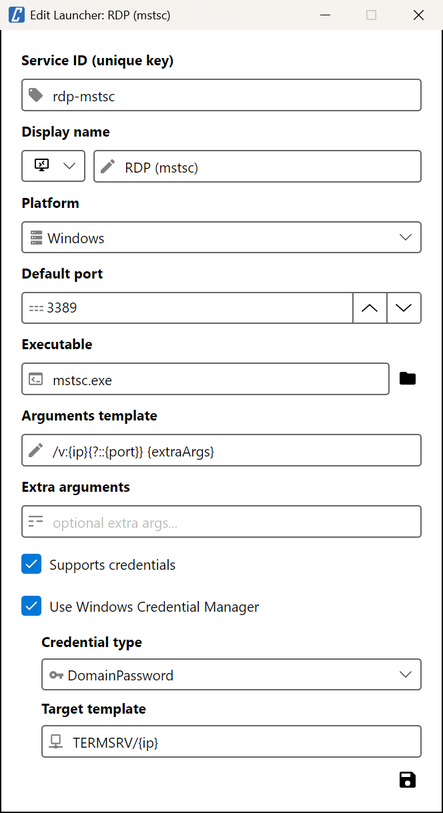
| Field | What it does |
|---|---|
| Service ID | Unique key of the launcher, referenced by the services. Cannot be changed once created. |
| Display name and icon | Shown in the Connect menu, the services window and the Open sessions strip. |
| Platform | Windows, Linux or OSX. |
| Default port | Pre-filled in new services and tried by Discover. |
| Executable | Program to start; the folder button opens a file picker. |
| Arguments template | Command line, with the tokens below. |
| Extra arguments | Default value of {extraArgs}; a service can replace it. |
| Supports credentials | Saved with the launcher; it does not change what is passed to the program: the template does. |
| Use Windows Credential Manager | Windows only: write the credentials to the Credential Manager before starting the program and delete them three seconds later. |
| Credential type | Generic or DomainPassword (the type mstsc reads). |
| Target template | Name of the Credential Manager entry; {ip} is replaced by the IP address, e.g. TERMSRV/{ip}. |
Argument template
Section titled “Argument template”The arguments are a template. Before starting the program cv4pve-vdi replaces:
| Token | Replaced by |
|---|---|
{ip} |
IP address or host name of the VM |
{port} |
The service’s port, empty when it equals the launcher’s default port |
{username} |
Username from the service’s credentials, or empty |
{password} |
Password from the service’s credentials, or empty |
{extraArgs} |
The service’s extra arguments, or the launcher’s |
{?…} |
The text inside, with its tokens replaced, only if {port}, {username} and {password} used inside are all non-empty; otherwise nothing |
{?…} keeps command lines clean: an option is written only when it has a value. Repeated spaces are
collapsed. The built-in templates:
RDP (mstsc) /v:{ip}{?::{port}} {extraArgs}RDP (xFreeRDP) /v:{ip}{?::{port}} /cert:ignore {?/u:{username}} {?/p:{password}} {extraArgs}SSH (PuTTY) -ssh {ip} {?-P {port}} {?-l {username}} {?-pw {password}} {extraArgs}SSH (cmd) /k ssh {?-p {port}} {?{username}@}{ip} {extraArgs}With the default port 3389 and credentials alice / secret, xFreeRDP gets
/v:10.0.0.5 /cert:ignore /u:alice /p:secret; on port 3390 without credentials, /v:10.0.0.5:3390 /cert:ignore.
Add your own launcher
Section titled “Add your own launcher”Settings → Launchers → +, then choose a Service ID that does not exist yet, a display name, an icon and the platform, set the executable and the arguments template, and save. Any program that takes the address on its command line can be a launcher.
Adding, editing and resetting launchers is written to ~/.cv4pve/vdi/launchers.yaml at once, without the
Save button of Settings.
Change or reset a built-in launcher
Section titled “Change or reset a built-in launcher”Built-in launchers come with cv4pve-vdi and cannot be deleted, but every field except the Service ID can be
edited, for instance the full path of putty.exe. A changed built-in launcher is saved whole in
~/.cv4pve/vdi/launchers.yaml, next to the custom ones, so it no longer follows changes to the built-in
definition in later versions of cv4pve-vdi.
The reset button in the launcher list puts every built-in launcher back to its defaults.