

# install
PS> winget install Corsinvest.cv4pve.vdi

# viewer for SPICE and VNC
PS> winget install RedHat.VirtViewer

# start
PS> cv4pve-vdi
# install (x64; arm64 and arm on the Releases page)
$ wget https://github.com/Corsinvest/cv4pve-vdi/releases/latest/download/\
cv4pve-vdi-linux-x64.zip
$ unzip cv4pve-vdi-linux-x64.zip
$ chmod +x cv4pve-vdi

# viewer for SPICE and VNC
$ sudo apt install virt-viewer

# start
$ ./cv4pve-vdi
# install (Apple silicon; Intel: osx-x64)
$ curl -LO https://github.com/Corsinvest/cv4pve-vdi/releases/latest/download/\
cv4pve-vdi-osx-arm64.zip
$ unzip cv4pve-vdi-osx-arm64.zip
$ chmod +x cv4pve-vdi

# start
$ ./cv4pve-vdi
Your Proxmox VE desktops, one click away
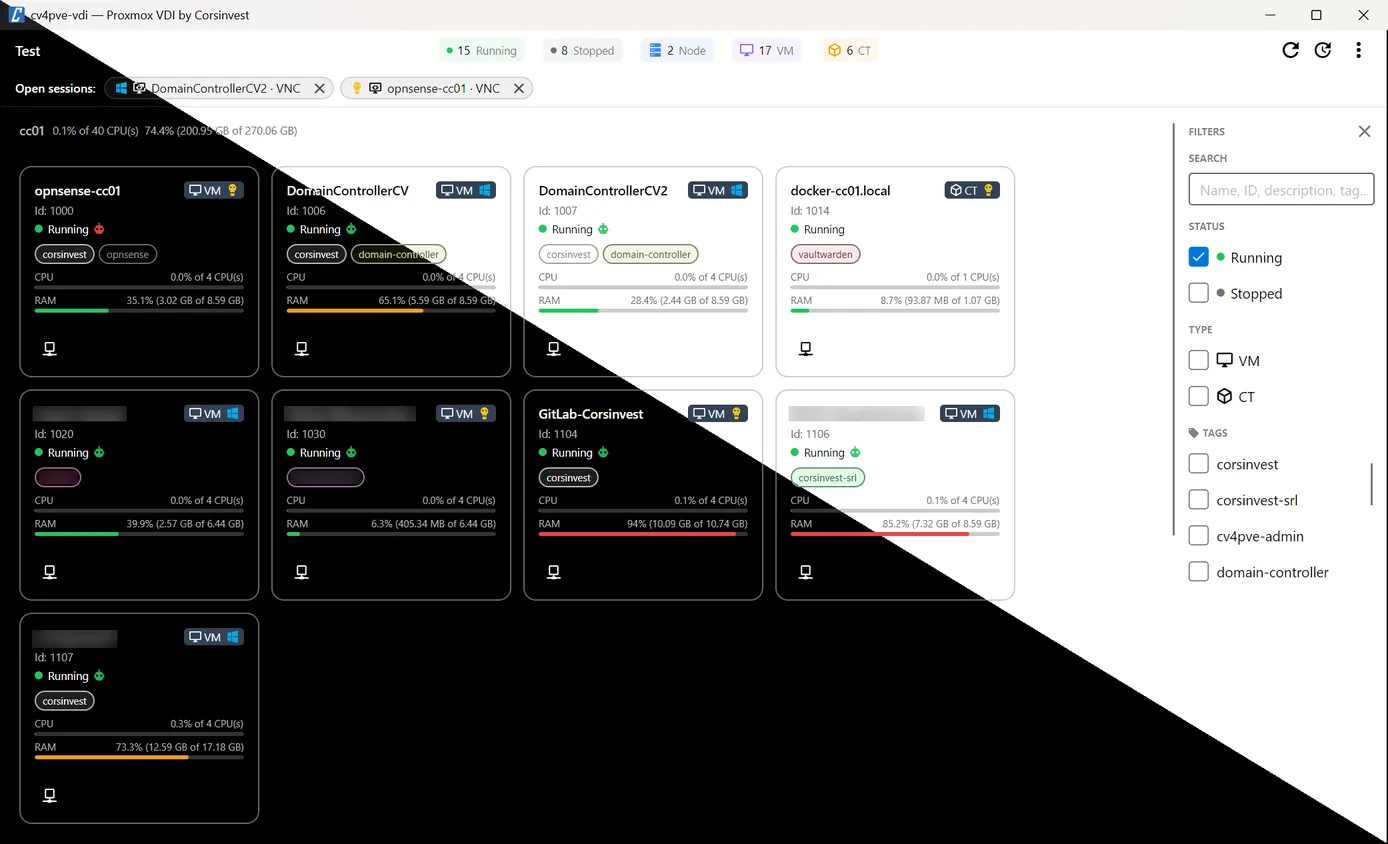
The Proxmox VE web interface is built for administrators. Someone who only needs to use a few VMs
(a developer with a test machine, an office worker on a Windows desktop, a thin client in a lab) has to
log into it, find the VM in the tree, open the console menu, download a .vv file for SPICE, or look up
the VM’s IP address before opening RDP.
cv4pve-vdi puts those VMs in one window. It logs in with the user’s own Proxmox VE account, so each person
sees only what the Proxmox permissions allow, and opens the connection with one click: SPICE or VNC through
remote-viewer, RDP or SSH through the tools already on the computer, with the IP address read from the
QEMU guest agent.
On your computer, API only
Section titled “On your computer, API only”cv4pve-vdi is a desktop application for Windows, Linux and macOS. It runs on the user’s computer, not on the
nodes, and talks to the Proxmox VE REST API on port 8006: nothing is installed on the cluster and no agent
runs on the nodes. SPICE goes through the spiceproxy every node already runs, VNC is tunnelled through the
API port itself; see How it connects.
The only other connection it makes is to GitHub, to check for a new release at start-up and then every 12 hours.
Where it fits
Section titled “Where it fits”| cv4pve-vdi | cv4pve-pepper | cv4pve-admin Resources | Proxmox VE web UI | |
|---|---|---|---|---|
| For | People who use VMs | Scripts and terminal users | Administrators, in a browser | Administrators |
| Runs | Desktop application | Command line | Web application | Browser |
| Connects with | SPICE, VNC, RDP, SSH, custom tools | SPICE, VNC | noVNC, xterm.js, SPICE | noVNC, xterm.js, SPICE |
| Access | Proxmox VE API, the user’s own account | Proxmox VE API | Proxmox VE API | - |
cv4pve-pepper is the command-line companion: one command opens a SPICE or VNC console. The console buttons of the Resources module in cv4pve-admin serve administrators who already work in its web interface.
What it does for you
Section titled “What it does for you”SPICE and VNC
SPICE for VMs with a SPICE display, VNC for every running VM and container, both in remote-viewer, VNC tunnelled over the API port.
02RDP, SSH and any tool
Services per VM: mstsc, xFreeRDP, PuTTY, ssh in a terminal, or your own launcher with an argument template.
03RDP single sign-on
On Windows, mstsc gets the Proxmox login or the service's own credentials through the Windows Credential Manager, removed a few seconds after launch.
04Only what you may use
The list shows the guests your Proxmox account can see; Start, Shutdown and the consoles follow its privileges.
05Kiosk mode
Full-screen login, settings behind an admin password, Switch user between people sharing a thin client.
06Open sessions
Every viewer and launcher you start is listed at the top of the window: bring it to the front or close it.
Connect to your first VM
Install cv4pve-vdi and remote-viewer, add your cluster, log in with your Proxmox account.
 Made by Corsinvest,
official Proxmox partner